Introducing marketing emails
Marketing email now lives inside Lettr. The new module adds Audiences for managing who you send to and Campaigns for designing and sending bulk email, all in the same account and on the same domains you already use for transactional sending.

Lettr started as a way to reliably send transactional email: password resets, receipts, verification codes, and the messages your product depends on. Sending the occasional product update or announcement to those same people is a different job, and most teams reach for a separate marketing tool to do it.
The new Marketing module closes that gap inside Lettr itself. It adds two features for marketing email: Audiences for managing who you send to and Campaigns for designing and sending emails in bulk, all in the same account and on the same domains you already use for transactional sending.
Introducing Audiences
The Audience is where Lettr keeps track of the people you send marketing emails to. It stores them as a single, team-wide pool of contacts rather than several separate audiences, so there is one shared place to manage who hears from you.
That single-record rule is what makes the rest predictable. A contact's subscription status, engagement history, and custom properties live in one place, so an unsubscribe or a bounce applies everywhere at once, and your reporting counts each person only once. The same holds at send time. When a campaign targets several overlapping lists and segments, anyone caught in more than one still receives it exactly once.
The point of a single pool is that the audience stays up to date without effort. Organize it however you like and target whatever slice a campaign needs; Lettr automatically keeps the underlying record of each person accurate for you.
Lists, segments, and topics
That pool can be grouped in three ways: lists, segments, and topics. A list is a hand-curated membership, with people added or removed one at a time, so it changes only when someone edits it. A segment is a membership defined by a rule, such as "subscribed contacts on the Pro plan," and it updates automatically as contacts change. Lastly, topics sit alongside both, allowing recipients to opt into the categories they want to hear about rather than being assigned to them by you.
The difference comes down to who decides. A list is your choice, a segment follows a rule, and a topic is the recipient's choice. Most audiences use all three together. Check our Audience docs to learn how to build each.
The wrong people stay off automatically
Just as important as who a campaign reaches is who it skips. Lettr automatically excludes anyone who has unsubscribed, bounced, or complained, without you having to maintain a suppression list. Once someone opts out of one campaign, they stay out of the rest.
Because this lives on the contact record rather than on each individual list, an opt-out follows the person wherever they appear. There is no stale copy on another list that could let a removed contact slip back into a future send.
Taken together, an Audience gives you one accurate pool of contacts, organized however you like with lists, segments, and topics, and kept clean of anyone who shouldn't be reached. That is the who. The next half is the what: turning that audience into an email worth sending.

Introducing Campaigns
Once your audience is in place, the other half of the marketing email is the message itself. A campaign is how Lettr sends a single email to your entire audience in bulk. All setup steps are described in our Campaigns docs.
Target a campaign to the audience you've already built, design something that looks great in every inbox with the Topol editor, and send it now or schedule it for later. Lettr takes care of the rest.
Each campaign can even have its own sending domain and from address, allowing one team to reach multiple customer bases, each arriving in the inbox exactly as designed. That last part is the work of the editor behind every campaign.
The visual editor is Topol's drag-and-drop builder
That editor is a drag-and-drop email builder powered by Topol, and it is worth a closer look. Topol is not a generic page builder bolted onto email. Instead, it is a dedicated email design tool, refined over years for the inbox, and it shows in the results. What you see while designing is what arrives, polished and consistent across clients, and built with ease.
That is what makes it the best part of building a campaign. The editor carries the email expertise, so your team doesn't have to, which means anyone can produce a professional email without struggle. And for those who want full control, a raw HTML editor is right there alongside it, ready to pick up from one of our premade templates or a blank canvas.
Merge tags and built-in compliance
Lettr also uses the same contact properties that shape your audience to populate the email.
Simply drop a merge tag like {{first_name}} into the subject or body, and a line
such as Welcome to Acme, {{first_name}}! reaches each person with their own details. This way, each campaign reads like it was written for one reader rather than blasted to a list.
And last but not least, compliance is handled by default. The law requires every marketing email to include a working unsubscribe link, and Lettr adds one to each send so a campaign can't accidentally ship without it.
Real-time analytics
Getting the email out is one thing; knowing whether it landed is another, and Lettr handles that side, too. The moment a campaign goes out, it shows how the send is performing in real time, so there is no waiting or guessing. Every metric that matters is there the moment it happens.
Additionally, Lettr retains those results after each campaign finishes, so every send becomes a benchmark for the next one. Campaigns can even be compared directly to each other, making it easy to see what performed well and carry it forward into the next send.
Separation of streams
Good numbers only matter if the email reaches inboxes in the first place, and that depends on how Lettr protects your sending reputation. Mailbox providers judge a sending domain by how all its mail behaves collectively, and marketing email naturally draws lower engagement and more complaints than transactional email. Lettr encourages you to keep the two streams on separate sending domains, each with its own reputation. As a result, marketing complaints count only against the marketing domain and transactional deliverability stays protected.
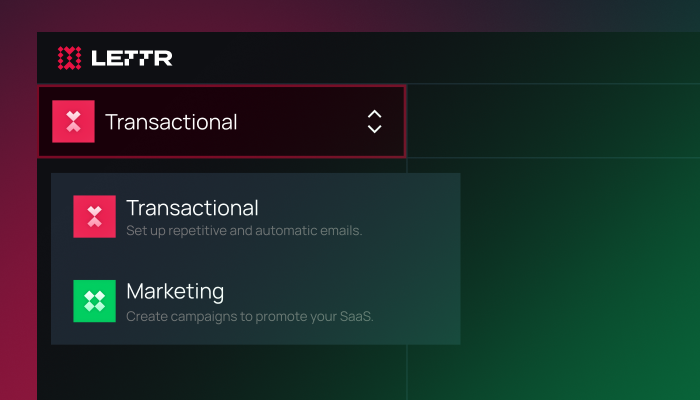
This separation is handled for you, so a failed campaign will never affect the transaction emails your users depend on. We cover the full reasoning and the migration steps in Why you should separate transactional and marketing email, so go ahead and give it a read.
Getting started
The steps are simple: build an Audience by adding contacts and organizing them into lists, topics, and segments; verify a sending domain (a dedicated marketing subdomain for the reputation reasons above); then design a campaign and send it.
The best way to get a feel for any of this is to try it. Every Lettr account includes a free 500-contact tier, so you can create an account at no cost, build a small audience, and send a real campaign to yourself in a few minutes.
Ready to send your first campaign? Create a free Lettr account and try Audiences and Campaigns today.